One click. One speaker.
Hear your mix through the left or right speaker without touching your DAW’s panning. Choose Center to listen through both.
Left · Center · RightVersion 2.0 · Monitoring utility
Check your mix in true mono, listen to Mid or Side, and choose your monitoring speaker with one click.
Mac: AU, VST3, AAX and CLAP, all as Universal Binaries for Intel and Apple silicon. Windows: VST3, AAX and CLAP (64-bit).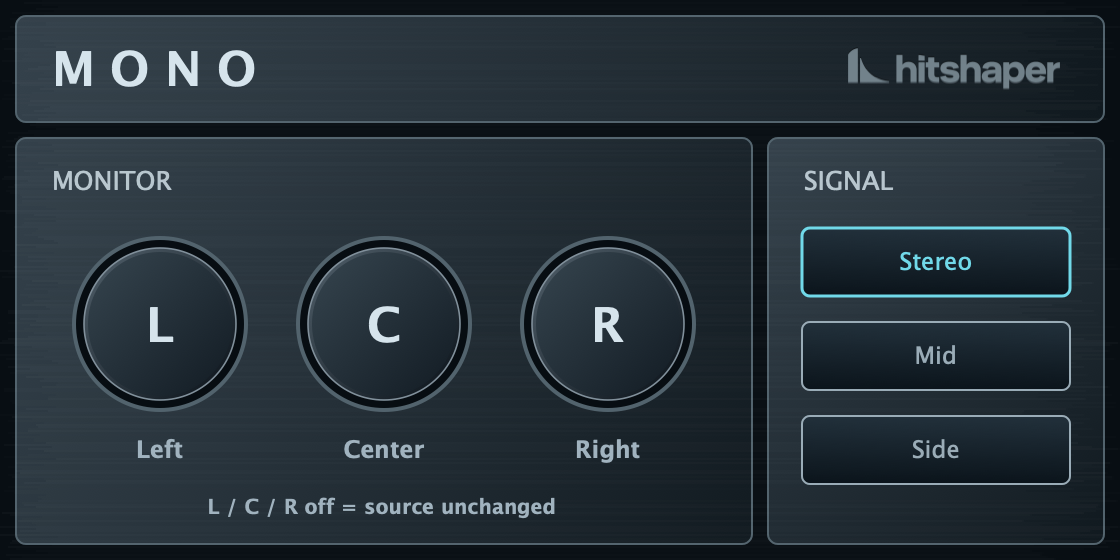
Inside Mono 2
Check the center, explore the sides and hear what holds together.
Hear your mix through the left or right speaker without touching your DAW’s panning. Choose Center to listen through both.
Left · Center · RightListen to the shared center of your mix. Check how the kick, bass and lead vocal sit together.
Mid signal · (L + R) / 2Isolate the difference between left and right. Hear stereo ambience, wide layers and effects in detail.
Side signal · (L − R) / 2Dedicated Stereo, Mid and Side buttons select what you hear. Left, Center and Right select where you hear it. Every mode is one click away, with no menus.
Separate Signal and Monitor controlsReopen your project with your monitoring setup intact. Your source and speaker selections stay with the session.
Signal and Monitor settings saved with your sessionAutomate Signal and Monitor settings in your DAW to repeat the same listening checks. The redesigned interface includes hover hints, and Mono remains free.
DAW automation · hover hints · still freeFree monitoring utility
Get Mono and make checking your mix a little easier. Register once and we’ll email you the download link.
Mac: AU / VST3 / AAX / CLAP · Windows: VST3 / AAX / CLAPAlready enjoying Mono? Support its development with a donation.
A few details, and you’re ready to go.
Why Mono?
Make a quick mono check part of your mix.
Listening through one speaker takes stereo width out of the picture. It gives you another way to judge the balance between your vocals, drums and instruments.
A mono sum played through two speakers creates a phantom center. With Mono, you can send that signal to just one speaker, then switch back to stereo without changing your DAW’s panning.
Explore the user manual
Windows 10 (22H2) or later, 64-bit (x64). Windows 11 recommended.
macOS 12.0 or later (Intel and Apple silicon)
DAW with support for Audio Units / VST3 / AAX / CLAP






Plugin updates, new releases and occasional offers.
Unsubscribe anytime. Privacy policy